.png)
Teddy vs GroomPro: Side-by-Side Comparison
Teddy vs GroomPro: compare features, pricing, and SMS tools for your pet grooming business



Both Teddy and GroomPro target independent groomers, but they take different approaches to features and pricing. This comparison helps you understand which fits your business better.
Quick Comparison
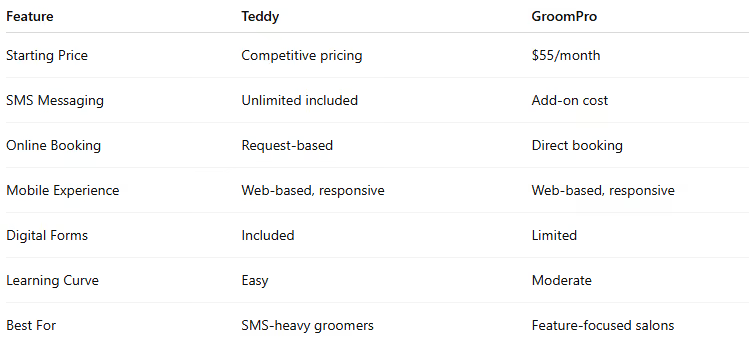
Pricing Analysis
Teddy Pricing
- Single plan: Competitive pricing
- SMS: Unlimited included
- No hidden fees
- 14-day free trial
GroomPro Pricing
- Standard: $55/month
- Premium: $85/month
- SMS: Additional cost (~$0.03–$0.04 per message)
- 14-day free trial
Real Monthly Cost Comparison
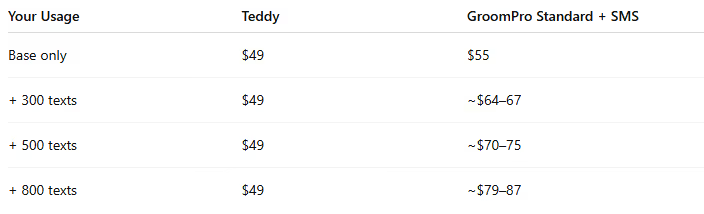
For groomers who communicate frequently via text, Teddy’s unlimited messaging creates significant savings.
Feature Comparison
Scheduling & Calendar
Teddy
- Clean, modern calendar interface
- Day / week / month views
- Multi-groomer scheduling
- Drag-and-drop appointments
- Recurring booking options
- Color-coded by groomer or service
GroomPro
- Full-featured calendar
- Multiple view options
- Staff scheduling
- Appointment templates
- Resource management
- Recurring appointments
Verdict: Both offer solid scheduling. GroomPro has a slight edge in staff and resource management, while Teddy offers a cleaner interface.
Client Communication
Teddy
- Unlimited two-way SMS
- Automated appointment reminders
- Custom message templates
- Complete conversation history
- No per-message fees
- AI receptionist option
GroomPro
- SMS messaging (paid per message)
- Automated reminders
- Email communications
- Message templates
- Communication logs
Verdict: Teddy wins decisively on messaging value. Unlimited SMS with no extra cost is a major differentiator.
Online Booking
Teddy
- Request-based booking
- Clients submit requests; you approve
- Prevents calendar conflicts
- Integrated intake forms
- Website booking widget
GroomPro
- Direct booking into open slots
- Clients view availability and book
- Customizable booking rules
- Basic intake during booking
Verdict: Different approaches. Request-based booking (Teddy) offers more control, while direct booking (GroomPro) prioritizes client convenience.
Client & Pet Management
Teddy
- Detailed client profiles
- Comprehensive pet profiles
- Grooming history tracking
- Notes and preferences
- Photo storage
- Digital intake forms
- Service agreements
GroomPro
- Client database
- Pet records
- Service history
- Vaccination tracking
- Notes and alerts
- Basic document storage
Verdict: Teddy’s digital forms and agreements add value. Both handle core client management well.
Payments & Invoicing
Teddy
- Square integration
- Invoice creation
- Payment tracking
- Tip management
- Transaction history
GroomPro
- Built-in payment processing
- Multiple payment options
- Invoicing features
- Package sales
- Basic inventory
Verdict: GroomPro offers more payment flexibility. Teddy works best for groomers already using Square.
Reporting
Teddy
- Revenue reports
- Appointment analytics
- Client retention metrics
- Basic business insights
GroomPro
- Sales reports
- Staff performance tracking (Premium)
- Revenue by service
- Client reports
- Business analytics
Verdict: GroomPro provides deeper reporting, especially on the premium tier. Teddy covers essential metrics.
Pros and Cons
Teddy
Pros
- Unlimited SMS messaging included
- Lower base price
- Modern, intuitive interface
- Quick learning curve
- Digital intake forms and agreements
- AI receptionist feature
- Predictable monthly cost
Cons
- Newer platform
- Square-only payments
- Fewer advanced features
- Limited integrations
- No native mobile app
GroomPro
Pros
- Comprehensive feature set
- Flexible payment processing
- Deeper reporting options
- Strong staff management tools
- Package and product sales
Cons
- SMS costs add up
- Higher base price
- Less modern interface
- Premium features require upgrade
- Steeper learning curve
Who Should Choose Teddy?
Teddy is right for you if
- You text clients frequently (300+ messages/month)
- You want simple, modern software
- Digital intake forms matter
- You prefer request-based booking control
- Predictable costs are important
- You use (or plan to use) Square
Real example: A mobile groomer texting arrival times, gate codes, and confirmations throughout the day. Unlimited messaging saves $20–$40/month compared to pay-per-text options.
Who Should Choose GroomPro?
GroomPro is right for you if
- You need flexible payment processing
- Staff management is a priority
- You want deeper reporting
- Retail or product sales matter
- You prefer direct online booking
- You don’t text heavily
Real example: A small salon with three groomers needing staff scheduling, performance tracking, and retail sales tools.
The SMS Factor: Deep Dive
Communication volume should strongly influence your decision.
Typical monthly messaging includes
- Appointment confirmations: 4–5 per client
- Day-of reminders: 1–2 per appointment
- Rescheduling conversations: varies
- Running-late notifications: 2–3 per day
- Post-groom updates: optional
A groomer with 80 appointments per month can easily send 400–600 texts.
Cost comparison at 500 texts
- Teddy: $49 (included)
- GroomPro: $55 + ~$15–$20 SMS = $70–$75
That’s a $21–$26 monthly difference — over $250 per year.
Digital Forms Advantage
Teddy includes built-in digital intake forms and service agreements, which provide:
- Faster onboarding — clients complete forms before arrival
- Liability protection — agreements stored digitally
- Time savings — no printing or scanning
- Professional experience — modern client workflow
GroomPro offers basic document storage but lacks fully integrated forms.
Interface & User Experience
You’ll spend hours each week in your grooming software, so usability matters.
Teddy
- Modern, clean design
- Minimal clutter
- Intuitive navigation
- Fast to learn
GroomPro
- Feature-rich layout
- More options visible
- Traditional software feel
- More depth, more learning
Neither approach is wrong — it comes down to preference.
Switching Considerations
From GroomPro to Teddy
- Export client data (CSV)
- Import into Teddy
- Recreate service menu
- Set up message templates
- Adjust to request-based booking
From Teddy to GroomPro
- Export and import client data
- Configure additional features
- Set up payment processing
- Budget for SMS costs
- Learn new interface
Both platforms support standard data exports.
Frequently Asked Questions
Which is cheaper overall?
It depends on texting volume. Under 200 texts/month, GroomPro may be cheaper. Over 300, Teddy usually wins.
Does GroomPro offer unlimited texting?
No. SMS is charged per message.
Can I try both?
Yes. Both offer 14-day free trials.
Which has better support?
Both have responsive support. GroomPro has a longer track record; Teddy offers more hands-on assistance.
Is Teddy good for multi-groomer salons?
Yes. Teddy supports multi-groomer scheduling and works best for teams of 1–5 groomers.
The Verdict
Choose Teddy if unlimited SMS, modern design, and digital forms are your top priorities. Ideal for solo groomers and small teams who rely heavily on texting.
Choose GroomPro if payment flexibility, advanced reporting, and robust staff tools matter most. Best for salons needing deeper operational features.
Both platforms are capable. The right choice depends on texting volume, payment needs, and interface preference.
Test Before You Commit
- Teddy: 14-day free trial at tryteddy.com
- GroomPro: 14-day free trial at groompro.com
Book test appointments, send messages, and explore workflows. The best option becomes obvious once you try it.




![Teddy vs Gingr: Complete Comparison [2026]](https://cdn.prod.website-files.com/64ac1f211014e9b293d35a4a/698dede605a81497c71168d0_Teddy%20vs%20Gingr_%20Complete%20Comparison%20%5B2026%5D.png)