.png)
How to Send Automated Appointment Reminders
Learn how to set up automated appointment reminders for your grooming business.



Automated reminders are one of the highest-impact, lowest-effort improvements you can make to your grooming business. Set them up once, and they work forever—reducing no-shows and keeping your clients informed without any ongoing effort from you.
Here’s exactly how to implement effective appointment reminders.
Why Automated Reminders Matter
Let’s start with the numbers.
Without reminders:
- 8–12% no-show rate is typical
- At $75 per appointment, that’s $3,000–$4,500 lost annually for every 10 weekly appointments
With automated reminders:
- 2–4% no-show rate is achievable
- Same math: $750–$1,500 lost annually
- Savings: $2,000–$3,000+ per year
Beyond money, reminders also:
- Save you from making manual reminder calls
- Give clients time to reschedule if needed
- Reduce last-minute cancellations
- Improve client satisfaction (clients appreciate the heads-up)
Choosing Your Reminder Method
Text Messages (SMS)
Why text works best:
- 98% open rate (vs. ~20% for email)
- Read within minutes
- Easy to respond
- Works on any phone
Best for: All appointment reminders.
Why email still has a place:
- Good for detailed information
- Works for less time-sensitive messages
- Some clients prefer it
Best for: Confirmation details, policy reminders, and follow-ups.
Phone Calls
When calls make sense:
- Very high-value appointments
- Clients without text capability
- Personal touch for VIPs
Drawback: Time-consuming and not scalable.
Recommendation: Use text for reminders and email for supplementary information.
Setting Up Automated Reminders
Step 1: Choose Your Platform
You’ll need software that sends reminders automatically. Options include:
Grooming-specific software (Teddy, MoeGo, Gingr):
- Reminders integrated with scheduling
- Pet-specific personalization
- Built for grooming workflows
Generic scheduling tools (Calendly, Acuity):
- Basic reminder functionality
- Lacks pet-specific features
Standalone SMS services (SimpleTexting, TextMagic):
- Requires separate scheduling software
- More manual setup
For most groomers, integrated grooming software is the smoothest option.
Step 2: Determine Reminder Timing
When should reminders go out?
Common timing strategies:
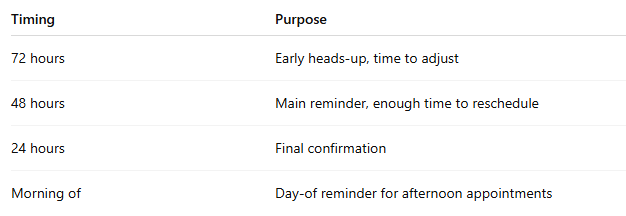
Recommended starting point:
- First reminder: 48 hours before
- Second reminder: 24 hours before
This gives clients time to reschedule while keeping the appointment fresh in mind.
Step 3: Write Your Reminder Messages
Good reminders are:
- Clear and concise
- Friendly but professional
- Actionable (confirm or reschedule)
- Personalized when possible
48-hour reminder template:
Hi [Client Name]! 🐶 Reminder: [Pet Name] has a grooming appointment on [Day] at [Time] with [Business Name].
Reply YES to confirm or call [Phone] if you need to reschedule. See you soon!
24-hour reminder template:
Hi [Client Name]! Just a reminder that [Pet Name]’s grooming appointment is tomorrow at [Time].
Reply YES to confirm. Looking forward to seeing you!
Morning-of template (for afternoon appointments):
Hi [Client Name]! [Pet Name]’s appointment is today at [Time]. See you this afternoon! 🐾
Step 4: Configure in Your Software
In most grooming software:
- Go to Settings → Reminders (or Notifications)
- Enable automated reminders
- Set timing for each reminder
- Customize message templates
- Save and activate
Specific steps vary by platform, but the process is typically straightforward.
Step 5: Test Your Reminders
Before going live:
- Book a test appointment for yourself
- Wait for reminders to send
- Verify they arrive correctly
- Check personalization (names, times, etc.)
- Test the reply/confirm function
Catch problems before they affect real clients.
Advanced Reminder Strategies
Confirmation Requests
Why confirmation matters:
- Engaged clients are less likely to no-show
- You know who to follow up with
- Creates two-way interaction
How to implement:
Include “Reply YES to confirm” in your reminder. Track responses in your dashboard and follow up with non-responders.
Different Reminders for Different Services
Not all appointments are equal. Consider varying reminders.
New client first visit:
Include:
- Your address/location
- Parking instructions
- What to bring (vaccination records)
- Cancellation policy
Long appointments (2+ hours):
Add an extra reminder about the time commitment.
Mobile grooming:
Include arrival time range and any access instructions needed.
Re-engagement Messages
Beyond appointment reminders, consider automating:
Rebooking prompts:
“Hi [Client]! It’s been 6 weeks since [Pet]’s last groom. Ready to schedule? Reply to this message or book online at [link].”
Vaccination reminders:
“Our records show [Pet]’s rabies vaccination expires next month. Please bring updated records to your next appointment.”
Birthday messages:
“Happy birthday to [Pet]! 🎂 We have a special treat waiting at their next appointment!”
Handling Reminder Responses
Confirmations
Most software automatically marks appointments as confirmed when clients reply YES. If not, check regularly and update manually.
Reschedule Requests
When clients ask to reschedule:
- Respond promptly (within 30 minutes if possible)
- Offer alternative times
- Update the appointment
- Confirm the new time
Cancellations
When clients cancel via text:
- Acknowledge their cancellation
- Offer to reschedule
- Check your waitlist for a fill-in
- Apply your cancellation policy if applicable
No Response
For clients who don’t respond to reminders:
- Call them the day before
- Consider requiring a card on file for future bookings
- Note the pattern in their file
Common Reminder Mistakes
Mistake 1: Sending too many
Three reminders are usually plenty. Five is annoying.
Mistake 2: Sending too few
One reminder isn’t enough for most clients. At least two is recommended.
Mistake 3: Wrong timing
Reminders sent at 3 AM are jarring. Schedule for reasonable hours (8 AM–8 PM).
Mistake 4: No personalization
“You have an appointment scheduled” feels cold. Include the pet’s name and details.
Mistake 5: Unclear call to action
Clients should know exactly what to do—confirm, call if changes are needed, etc.
Mistake 6: No follow-up system
Reminders only work if you act on non-responses. Have a plan in place.
Measuring Reminder Effectiveness
Track these metrics:
Confirmation rate:
What percentage of clients confirm after reminders?
Goal: 70–80%+
No-show rate:
Compare before and after implementing reminders.
Goal: Under 4%
Response time:
How quickly are clients confirming? Faster responses show engagement.
Opt-out rate:
How many clients unsubscribe from reminders?
If high, your messages may be too frequent or poorly timed.
Platform-Specific Considerations
Teddy
Includes:
- Unlimited SMS (no per-message costs)
- Customizable timing and messages
- Confirmation tracking
- Two-way texting
Setup path: Settings → Notifications → Appointment Reminders
MoeGo
Offers:
- Multiple reminder timing options
- Email and text reminders
- Template customization
Note: Per-message costs may apply.
Gingr
Requires:
- Additional SMS integration
- Configuration in notification settings
- Possibly a third-party SMS service
Generic Tools
If using generic scheduling software, you may need to:
- Integrate with a separate SMS service
- Set up automation rules manually
- Pay per message
Frequently Asked Questions
How many reminders should I send?
Two is the sweet spot for most groomers: one at 48 hours and one at 24 hours. Add a third at 72 hours for frequently forgetful clients.
What if clients find reminders annoying?
Most clients appreciate reminders. If someone requests fewer, honor that preference and note it in their profile. Always provide an opt-out option.
Should I use text or email?
Text for time-sensitive reminders. Email for supplementary information. Text has significantly higher open rates.
What time should reminders send?
During normal waking hours—typically 8 AM to 8 PM in your client’s time zone. Morning works well for next-day reminders.
Do reminders really reduce no-shows?
Yes. Most groomers see a 40–60% reduction in no-shows after implementing automated text reminders.
Your Reminder Setup Checklist
Initial setup:
- Choose your reminder platform
- Determine reminder timing (start with 48h + 24h)
- Write your reminder templates
- Configure in your software
- Test with a dummy appointment
Launch:
- Enable reminders for all future appointments
- Monitor the first week for issues
- Adjust timing or messages as needed
Ongoing:
- Track confirmation rate
- Follow up with non-responders
- Review no-show rate monthly
- Refine messages based on feedback
Final Thoughts
Automated reminders are one of those rare improvements that are easy to implement and guaranteed to help. The time investment is minimal—about an hour to set up—and the payoff is immediate.
Almost every groomer who implements proper reminders says the same thing: “I wish I had done this sooner.”
No-shows decrease. Client relationships improve. And you never have to manually call people to remind them about appointments again.
Set it up today. Your schedule—and your sanity—will thank you.



![Teddy vs Gingr: Complete Comparison [2026]](https://cdn.prod.website-files.com/64ac1f211014e9b293d35a4a/698dede605a81497c71168d0_Teddy%20vs%20Gingr_%20Complete%20Comparison%20%5B2026%5D.png)