.png)
How to Track Grooming Appointments in a Calendar
Stop losing track of appointments Learn to set up a grooming calendar and stay organized

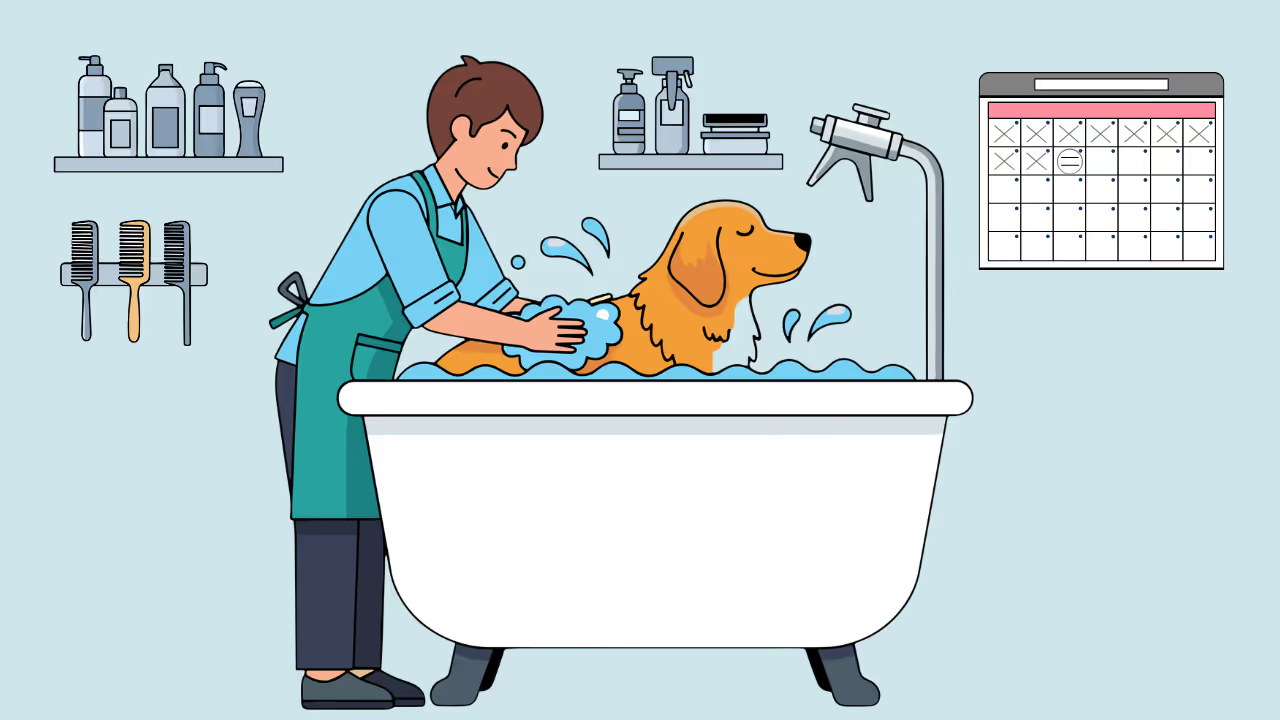


A grooming calendar sounds simple—just write down when dogs are coming. But the difference between a basic calendar and an effective scheduling system is huge. One leaves you scrambling to remember details; the other runs your entire operation.
Here’s how to set up calendar tracking that actually works for groomers.
Why Calendar Systems Matter for Groomers
Grooming isn’t like most appointments. Every booking has layers:
- Client contact info
- Pet details (breed, size, temperament)
- Service type and duration
- Special notes (matting history, behavior issues)
- Pricing variations
- Rebooking schedules
A calendar that just shows “Fluffy – 2pm” isn’t giving you what you need.
The Real Costs of Poor Calendar Management
Double-bookings — You’ve promised the same slot to two people. Someone’s getting rescheduled last minute.
Time miscalculations — You booked a Standard Poodle full groom into a 1-hour slot. Now you’re running behind all day.
Forgotten details — Was this the dog that bites during nail trims? You can’t remember.
No-shows you could have prevented — No reminder sent, client forgot.
Revenue leakage — Gaps in your schedule you didn’t notice could have been filled.
Good calendar systems prevent all of this.
Calendar Options for Groomers
Option 1: Paper Calendars
Still used by some groomers, but increasingly problematic.
Pros
- Simple, no learning curve
- Works without internet
- Some people prefer physical writing
Cons
- No automated reminders
- Can’t be accessed remotely
- Easy to lose or damage
- No client history attached
- Hard to search or reorganize
Verdict: Fine for very small operations, but you’ll outgrow it quickly.
Option 2: Generic Calendar Apps
(Google Calendar, Apple Calendar, Outlook)
Free and accessible, but not built for grooming.
Pros
- Free
- Syncs across devices
- Shareable with staff
- Basic reminders available
Cons
- No client database attached
- Manual data entry for every appointment
- Can’t track pet information
- No online booking integration
- Limited reporting
Verdict: Better than paper, but you’re doing a lot of manual work.
Option 3: General Scheduling Software
(Calendly, Acuity, etc.)
Built for appointments, but not pet-specific.
Pros
- Online booking capability
- Automated reminders
- Professional appearance
- Good calendar interface
Cons
- No pet profiles or breed tracking
- Doesn’t understand grooming services
- No matting notes or vaccination records
- Overkill features you won’t use
Verdict: Works in a pinch, but you’re missing pet-specific functionality.
Option 4: Grooming-Specific Software (Recommended)
Platforms built for pet groomers (Teddy, MoeGo, Gingr, etc.).
Pros
- Calendar + client database + pet profiles
- Breed-aware scheduling (knows Poodles take longer)
- Grooming notes attached to appointments
- Automated reminders via text/email
- Online booking designed for pets
- Rebooking and recall features
- Payment integration
Cons
- Monthly cost
- Learning curve
Verdict: Worth the investment for any groomer beyond hobby-level. The time savings and reduced errors pay for the software.
Setting Up Your Grooming Calendar
Whether you choose grooming software or a general tool, these principles apply.
Step 1: Define Your Working Hours
Block out when you’re available:
- Start and end times for each day
- Lunch breaks (protect these)
- Days off
- Vacation or closure dates
Be realistic. If you need 15 minutes between dogs, schedule for that.
Step 2: Set Service Durations
Every service needs a time allocation.
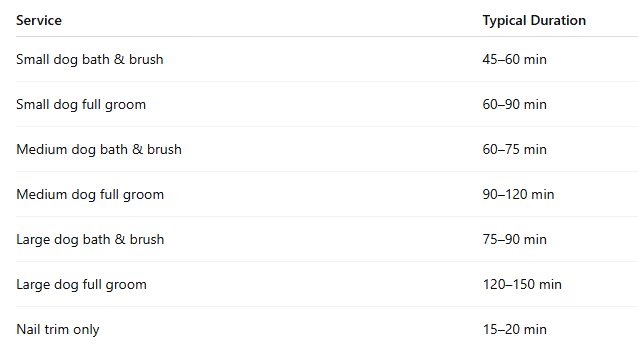
These vary by groomer speed and coat type. Track your actual times and adjust.
Step 3: Add Buffer Time
Don’t book back-to-back with zero gaps.
- Between appointments: 10–15 minutes for cleanup, notes, bathroom
- Start of day: 15 minutes buffer before first client
- End of day: 30 minutes for closing tasks
Buffers prevent the dreaded “running behind all day” spiral.
Step 4: Create Client and Pet Profiles
For each client, record:
- Name and contact info (phone, email)
- Address (especially for mobile groomers)
- Emergency contact
- Communication preferences
For each pet:
- Name, breed, age, weight
- Vaccination status
- Medical conditions
- Behavior notes
- Grooming preferences
- Photo (surprisingly useful)
This information should attach to every appointment automatically.
Step 5: Configure Appointment Views
Set up your calendar display for how you work.
- Day view: Today’s full schedule with details
- Week view: Plan ahead and spot gaps
- Month view: Capacity and time-off overview
Color-coding helps:
- Different colors for service types
- Confirmed vs. pending appointments
- First-time vs. returning clients
Step 6: Enable Reminders
Automated reminders reduce no-shows dramatically.
Standard reminder schedule
- 48 hours before: Reminder with date and time
- 24 hours before: “See you tomorrow” message
- Day-of (optional): “We’ll see [Pet] in 2 hours”
Text messages get read. Emails often don’t.
Step 7: Set Up Online Booking (Optional but Valuable)
Let clients book themselves.
- Reduces phone tag
- Fills your schedule while you’re grooming
- Clients love the convenience
With grooming software like Teddy, online booking connects directly to your calendar—no double entry.
Daily Calendar Management
Having a system is step one. Using it well is step two.
Morning Routine
Before your first appointment:
- Review today’s schedule
- Check messages or reschedule requests
- Verify tomorrow’s reminders
- Look ahead to next week
Five to ten minutes prevents chaos.
During the Day
At check-in
- Pull up the booking
- Confirm services
- Review notes
At checkout
- Mark appointment complete
- Add notes for next time
- Rebook if ready
Between appointments
- Update delays
- Check new bookings or cancellations
End of Day
- Review tomorrow’s schedule
- Confirm today’s appointments are completed
- Send follow-ups or rebooking reminders
- Note anything important
Weekly Review
Once a week, check the bigger picture.
- How full was the week?
- Any gaps or overbooking issues?
- Clients due for rebooking?
Handling Schedule Changes
Changes are inevitable. Handle them smoothly.
When Clients Cancel
- Update the calendar immediately
- Record the reason if provided
- Fill the slot using your waitlist
- Follow up to reschedule
When Clients Reschedule
- Check availability
- Update both old and new slots
- Send confirmation
- Note patterns of frequent changes
When You Need to Reschedule
- Contact the client ASAP
- Offer alternatives
- Apologize genuinely
- Update your calendar
Handling No-Shows
- Document it
- Attempt contact
- Note patterns
- Enforce policies if needed
Advanced Calendar Features
Recurring Appointments
- Every 4–8 weeks on the same day and time
- Builds consistency
- Shows your pipeline months ahead
Waitlist Management
- Track clients wanting specific dates
- Fill cancellations quickly
- Reward loyal or priority clients
Capacity Planning
- Dogs per day
- Busy vs. slow days
- Seasonal trends
Staff Scheduling
- Individual groomer calendars
- Shared visibility
- Conflict prevention
- Utilization tracking
Mobile Calendar Access
Essential for mobile groomers.
Phone Access
- App-based (not just web)
- Works with weak signal
- Fast and easy to update
Real-Time Updates
- Instant booking notifications
- No surprises
Navigation Integration
- Easy address copy/paste
- Route and drive-time awareness
Common Calendar Mistakes to Avoid
- Overbooking “just in case”
- No buffer time
- Ignoring breed differences
- Not using notes
- Forgetting to update
- Never reviewing the schedule
Choosing the Right Tool for You
If You’re Just Starting Out
- Google Calendar + Contacts
- Or a free grooming software trial
If You’re Established but Disorganized
- Switch to grooming-specific software
- Import data and set it up properly
If You Have Staff
- Multi-user access
- Shared client database
- Permission controls
If You’re Mobile
- Strong mobile app
- Offline capability
- Navigation features
Your Calendar Setup Checklist
Basic Setup
- Working hours defined
- Service durations set
- Buffer time included
- Breaks blocked
Client Management
- Client profiles created
- Pet details recorded
- Notes system in use
Automation
- Reminders enabled
- Confirmation messages set
- Rebooking prompts configured
- Online booking active
Daily Practice
- Morning review habit
- Same-day updates
- End-of-day review
- Weekly schedule check
Final Thoughts
Your calendar is the backbone of your grooming business. Every appointment, every client relationship, and every dollar of revenue flows through it.
A disorganized calendar creates stress and missed opportunities. A well-managed one creates smooth days, steady income, and a business that runs itself.
Set it up right. Use it consistently. Review it often.
Your future self will thank you.




![Teddy vs Gingr: Complete Comparison [2026]](https://cdn.prod.website-files.com/64ac1f211014e9b293d35a4a/698dede605a81497c71168d0_Teddy%20vs%20Gingr_%20Complete%20Comparison%20%5B2026%5D.png)